
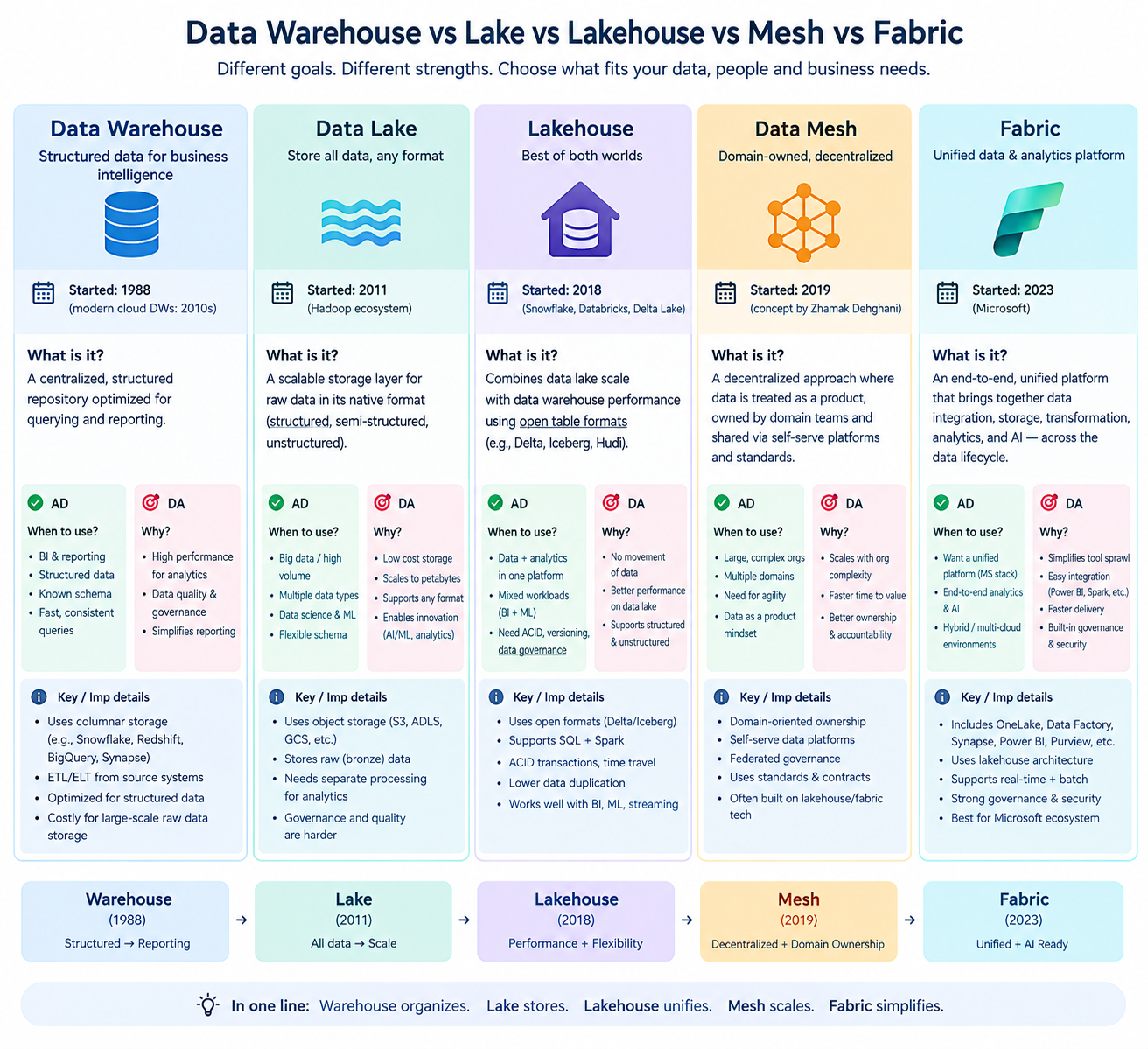
Modern data architecture can feel complicated when you encounter terms like Data Warehouse, Data Lake, Lakehouse, Data Mesh, and Data Fabric. But each concept addresses a different business problem.
- Warehouse: clean tables for reports.
- Lake: cheap storage for raw data of any kind.
- Lakehouse: a lake with a table layer, so it also works like a warehouse.
- Mesh: each team owns its data. A way of working, not a product.
- Fabric: Microsoft's all-in-one platform on one storage layer.
Explore the key differences, use cases, and benefits of modern data architectures. See the image below for a quick comparison.
 🔍 Click to expand
Imagine an online shopping company. It collects customer orders, website clicks, product images, payment records, and delivery updates. It needs to store this information, process it, protect it, and turn it into useful insights.
Let's break it down step by step in simple way how modern data storage architecture looks.
How a Modern Data Platform Works: From Source to Insights
Follow how raw data moves from its source to business insights and applications.
Events · CSV · JSON
Google Cloud Storage
Delta Lake · Catalog
Flink
AI / ML · Applications
Sources → Storage → Organization → Processing → Business Insights
1. Data Sources: Where does your data come from?
Every modern data architecture starts with data generated by business operations, applications, and external systems.
- Databases: Store operational data such as customer records, orders, and transactions.
- Business Applications: Generate data from CRM, ERP, finance, and HR systems.
- APIs & External Systems: Provide data from third-party services and partners.
- Events & Logs: Capture application activity, user behavior, and real-time events.
- Files & Documents: Contain CSV, JSON, Excel, images, and other data formats.
How Modern Data Storage Evolved
As data volumes and analytical needs grew, storage architectures evolved to address scalability, cost, and data management challenges.
- Relational Databases (RDBMS): Designed primarily for transaction processing (OLTP), with analytical capabilities that depend on workload and scale.
- Data Warehouses: Optimized for analytics (OLAP), reporting, and business intelligence.
- Hadoop & Cloud Data Lakes: Store large volumes of diverse data in distributed systems or object storage such as Amazon S3, ADLS, and GCS. Governance and metadata management are essential for reliable querying.
- Data Lakehouses: Combine data lake flexibility with table-level capabilities such as ACID transactions, schema enforcement, and time travel through formats such as Apache Iceberg, Delta Lake, and Apache Hudi.
2. Cloud Storage: Storage Foundation | Where does your data live?
Modern data platforms store large amounts of data in cloud storage, such as Amazon S3, Azure Data Lake Storage (ADLS), Google Cloud Storage (GCS), Oracle Cloud Storage, and IBM Cloud Object Storage. Data can also live in distributed file systems such as HDFS.
These systems provide scalable storage for data used in analytics, reporting, and machine learning. But storing data is only the first step; it also needs to be organized so data engines can read and manage it efficiently.
3. Data Organization: How is your data stored and managed?
Data is stored in file formats and organized into tables using table formats. Each serves a different purpose.
Managing thousands of files becomes difficult when data changes. Table formats track files and metadata to support reliable updates, schema changes, and historical snapshots.
- Apache Iceberg: Open tables with snapshots and schema evolution.
- Delta Lake: Tables with transaction support and time travel.
- Apache Hudi: Tables suited to updates and incremental data processing.
- Apache Paimon: Tables designed for streaming and batch workloads.
Example: An Apache Iceberg table can store data in Parquet files. Parquet defines how the data is stored; Iceberg manages the table metadata and snapshots.
4. Processing Engines: How is your data transformed and processed?
Processing engines read data, run queries, and transform it for analytics or applications. The right engine depends on whether you need batch processing, interactive analytics, or real-time streaming.
- Apache Spark: Large-scale batch processing, ETL pipelines, and machine learning.
- Trino: Fast, interactive SQL analytics across large datasets.
- Apache Flink: Real-time stream processing with low latency.
How Trino reads an Iceberg table: Trino reads Iceberg's metadata to identify the relevant Parquet files, then queries only the necessary data. Iceberg manages the table; Parquet stores the data; Trino executes the SQL.
- OLTP (transactions): Frequent inserts and updates, such as placing orders or processing payments. Examples: PostgreSQL and MySQL.
- OLAP (analytics): Queries across large datasets, such as monthly revenue reports. Examples: Trino and Snowflake.
Use OLTP for running the business; use OLAP for understanding the business.
5. Analytics & Applications: How does your data deliver value?
Once data is processed, it becomes useful for reporting, decision-making, and building applications.
- Business Intelligence: Build dashboards and reports using Power BI or Tableau.
- Business Analytics: Analyze sales, revenue, customer behavior, and business performance using SQL.
- Machine Learning & AI: Build predictive models, recommendation systems, and AI applications.
- Applications & APIs: Deliver trusted data to business applications, products, and internal services.
- Real-Time Insights: Monitor transactions, detect fraud, and track events as they happen.
Which Data Architecture Fits Your Needs?
Choose the option that best matches your organization's needs. See how data is stored, organized, processed, and used for analytics.
RECOMMENDED STARTING POINT
Data Warehouse
Choose a data warehouse when your main goal is reliable business reporting, consistent KPIs, and fast SQL queries over structured, curated data.
Why it fits: Data is cleaned and modeled before business users consume it, helping teams use consistent definitions of revenue, customers, and performance.
Typical technology stack
| Cloud / storage | Snowflake-managed storage, BigQuery storage, or Amazon Redshift on AWS. |
|---|---|
| File formats | CSV, JSON, or Parquet for ingestion and data exchange. |
| Table format | Usually managed warehouse tables; Iceberg may be used for open-table access. |
| Processing | SQL, warehouse compute, and ELT pipelines. |
| Analytics | Power BI, Tableau, SQL reports, and business dashboards. |
How the 5 steps fit
- Data sources: Applications, databases, APIs, and business systems.
- Cloud storage: Data enters warehouse-managed storage or a connected storage layer.
- Data organization: Data is cleaned and modeled into tables such as customers, sales, and orders.
- Processing: SQL and ELT pipelines transform data into query-ready datasets.
- Analytics: BI dashboards and reports provide trusted business metrics.
Wrapping Up & Next Steps
Modern data storage combines file formats, table formats, and processing engines to build scalable data platforms. Explore the related guides below to learn more.
Read the previous blog Reading from Any Source & Writing to Microsoft Fabric Lakehouse with PySpark →Coming soon
• Deep dive into table formats like Apache Iceberg
• Apache Spark and Trino processing engines
• Lakehouse maintenance and performance tuning
Feedback & Comments
Found this guide helpful or have a question about modern data storage? Share your thoughts below.

Recent Comments
Loading comments...